Nespresso Blinking Orange: What It Means on Each Line

ORANGE, BLINKING
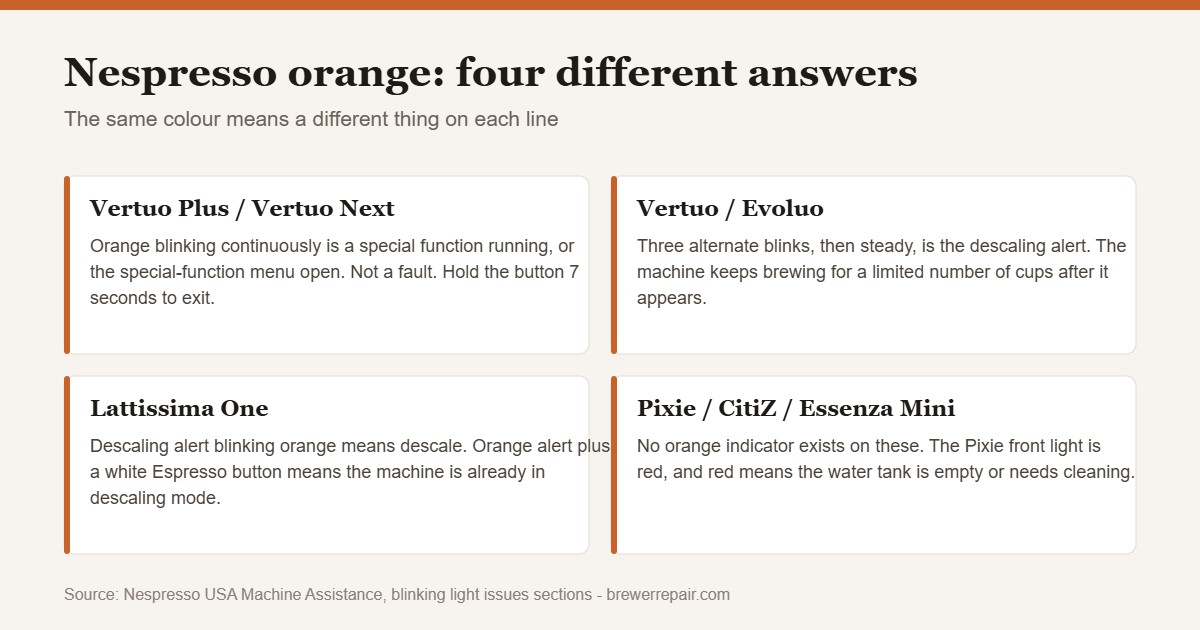
On a Vertuo Plus or Vertuo Next, a blinking orange light is not a fault: Nespresso documents it as a special function running or the special-function menu awaiting a choice. Hold the button seven seconds to exit. On a Lattissima, orange on the descaling alert means descale. The Pixie, CitiZ and Essenza Mini have no orange indicator at all.
What this code actually means
Depends on the line. Vertuo Plus and Vertuo Next: a special function is running or the special-function menu is open - not a fault. Lattissima: descaling alert. Original line (Pixie, CitiZ, Essenza Mini): no orange indicator exists.
Reset sequence
Run these in order. If the code returns immediately, the underlying fault is still present — see the repair guide below.
-
Identify the line first: Vertuo takes round barcoded capsules, Original takes cone capsules.
-
Vertuo Plus or Next, orange blinking: finish the special function you started, or hold the button 7 seconds to exit.
-
Vertuo or Evoluo, 3 blinks then steady: run a full descaling cycle.
-
Lattissima, orange descaling alert: press Espresso to start the cycle when the Espresso button lights white.
-
Pixie, red front light: fill and clean the water tank.
-
Any pattern not listed by Nespresso for your model: the machine needs service, not a reset.
Orange is the most misread light on a Nespresso machine, because on the line that uses it most it does not mean anything is wrong. On a Vertuo Plus or a Vertuo Next, a continuously blinking orange light is the machine telling you a special function is running or waiting to be chosen. People see it, assume a fault, and start unplugging things in the middle of a descaling cycle.
The answer also depends entirely on which Nespresso line you own, and the two lines do not share a light language. Everything below is taken from Nespresso’s own machine assistance pages for each model, not from guesswork.
First: which Nespresso line do you have?
Nespresso sells two incompatible systems and they signal differently. Vertuo machines take round, barcoded capsules and have one large button on top. Original machines — Pixie, CitiZ, Essenza Mini, Inissia, Lattissima — take the small cone-shaped capsules and usually have two cup-size buttons. If you have an Original machine and you are seeing orange, it is almost certainly a Lattissima descaling alert, because the rest of the Original line has no orange indicator at all.
Vertuo Plus and Vertuo Next: orange is not a fault
These two share one light map, and Nespresso documents orange only in the context of special functions:
- Orange blinking continuously — a special function is running, or the special-function menu is in selection mode. Nespresso points you to the descaling, cleaning, emptying-the-system or factory-reset section depending on which one you started.
- Red flashing twice, then back to steady orange — you are in the special functions menu. Choose the function you want by pressing the lever down.
- Red flashing twice, then back to orange blinking — a special function is running and has been interrupted. Open the machine head, let the capsule eject, then restart the function with the button. If you are in emptying-the-system mode, remove the water tank.
The practical reading is simple. Orange on a Vertuo Plus or Next means you, or someone else, put the machine into a service mode. Nothing is broken. The fix is to finish the cycle or exit it.
How to get out of the special-function menu
If you did not mean to be in it, the documented exit on the Vertuo range is to hold the button for at least seven seconds. Nespresso gives this instruction specifically for a machine that will not stop blinking and is not being asked to clean, descale or empty. Hold, release, and the machine should return to a normal ready state.
The original Vertuo and Evoluo: three blinks, then steady
The first-generation Vertuo uses a different alert. Nespresso documents a light blinking alternately three times and then going steady as descaling needed. It is an advisory, not a lockout — the machine will still brew for a while after the alert first appears, but not indefinitely. The full procedure for this range is in descaling a Nespresso Vertuo.
Two more from the same page are worth knowing because they get mistaken for faults. One blink and one pause, machine will not start means fill the water tank and check the lever is locked. Light blinking while the machine is running is normal if coffee is flowing.
Lattissima: orange means descale
On the Lattissima One, Nespresso documents the descaling alert blinking orange as exactly what it looks like: the machine has counted enough beverages to trigger a descale. If the descaling alert blinks orange and the Espresso button lights white, the machine is already in descaling mode and is waiting for you to press Espresso to start the cycle.
Two other Lattissima patterns are documented and are not orange, but they answer the panic version of this question. All buttons blinking simultaneously for ten seconds and then the machine switching off is an error alarm that needs service. All three buttons blinking fast three times and then returning to ready just means the water tank is empty.
The Original line has no orange light
This is the part that saves people the most time. On the Pixie, CitiZ and Essenza Mini, Nespresso publishes only three light states, and none of them are orange:
- No light — the machine powered off automatically, or check the mains, plug, voltage and fuse.
- Irregular blinking — on the Pixie, exit the descaling procedure; on the CitiZ and Essenza Mini, Nespresso’s documented answer is to send the appliance for repair.
- Front light red (Pixie only) — the water tank is empty or needs cleaning.
If you are certain you have a Pixie or CitiZ and you are certain the light looks orange, you are almost certainly looking at the red indicator through a warm-white diffuser. Treat it as red: check the tank first. A tank that is seated badly or has gone cloudy is a common cause, and matching a replacement tank to your model matters because they are not interchangeable across the range.
Red patterns on Vertuo Plus and Vertuo Next
Since most orange questions turn out to be red questions, here is the documented red map for the same two machines:
- Half green, half red steady — descaling needed.
- Red blinking continuously, head stops moving — remove the obstruction and empty the capsule container.
- Red blinking twice, back to steady green — fill the water tank, eject the capsule, check a fresh one is seated.
- Red blinking three times every two seconds, back to steady red — lever up, wait for the head to stop, clear the obstruction, close the head.
- Red steady, machine not running — overheat. Off, unplug, fifteen minutes to cool, then power back on.
- Red fading out — the machine is cooling down on its own and will go green.
If the machine gets past the lights but still will not deliver, the order to check is in Nespresso Vertuo not pumping water, and a machine that leaks around the head is covered in finding the source of a Vertuo leak.
What Nespresso does not publish
There is no official orange mapping for the Inissia, the Essenza Plus, the Creatista or the Expert. Nespresso’s assistance pages for those models list leaks, flow and no-light states but stop short of a colour-coded blink table. Anyone giving you a confident count of orange blinks for those machines is inferring it, and the failure mode of a wrong guess here is that you run a descaling cycle the machine never asked for. If your model is not covered above, the documented catch-all on the Lattissima page applies across the range: any blinking behaviour not described in the troubleshooting means the appliance needs service.
For the same question on other brands, see Keurig all lights flashing and De’Longhi lights flashing.
Descaling solution these machines take
Most orange lights on a Nespresso end in the same place: a descale. Nespresso’s own kit is formulated for the pressures and seals in these machines, and the alert will not clear until a full cycle plus rinse has been completed.


Sources
Nespresso USA Machine Assistance pages, blinking light issues sections: Vertuo, Vertuo Plus, Vertuo Next, Pixie, CitiZ, Essenza Mini and Lattissima One. Retrieved September 2026. Nespresso Club customer service: 877-964-6299.
If the code comes back
Nespresso Vertuo Not Pumping Water: The Order to Check Full repair guide — causes ranked by likelihood
The part you need
Nespresso Water Tank Replacement: Match It to Your Model
Paid link. We earn a commission if you buy — the guides stay free.
Related questions
Does orange always mean my Nespresso is broken?
No. On a Vertuo Plus or Vertuo Next, Nespresso documents a continuously blinking orange light as a special function running or the special-function menu waiting for a selection. It is a service mode, not a fault. On a Lattissima, orange on the descaling alert means the machine wants descaling.
How do I stop my Nespresso Vertuo from blinking?
Nespresso's documented exit for a Vertuo that keeps blinking with no cleaning, descaling or emptying intended is to hold the button for at least seven seconds. That leaves the special-function state and returns the machine to ready.
Why is my Pixie or CitiZ light orange?
It is not. Nespresso publishes no orange indicator for the Pixie, CitiZ or Essenza Mini. The Pixie has a red front light, which means the water tank is empty or needs cleaning. Irregular blinking on a CitiZ or Essenza Mini is a service call.
What does three blinks then a steady light mean on a Vertuo?
On the first-generation Vertuo and Evoluo, Nespresso documents a light blinking alternately three times and then going steady as descaling needed. The machine will keep brewing for a limited number of uses after the alert appears.
My Vertuo shows half green and half red. What is that?
That is the descaling alert on the Vertuo Plus and Vertuo Next. Nespresso says the machine can still be operated for a few more brews after it appears, but a descale is due.